
The real question isn’t whether ERP systems are powerful—the data supports that. It’s whether your business has reached the point where that power becomes necessary rather than just desirable. I’ve watched small companies struggle for years with disconnected spreadsheets, manual data entry, and siloed departments before finally making the leap, and I’ve also seen businesses implement expensive ERP systems far too early, drowning in features they never used. The answer to “do small businesses need an ERP” is frustratingly unsatisfying but absolutely true: it depends. Here’s what it depends on, because that distinction will save you tens of thousands of dollars and months of implementation headaches.
What Is an ERP System?
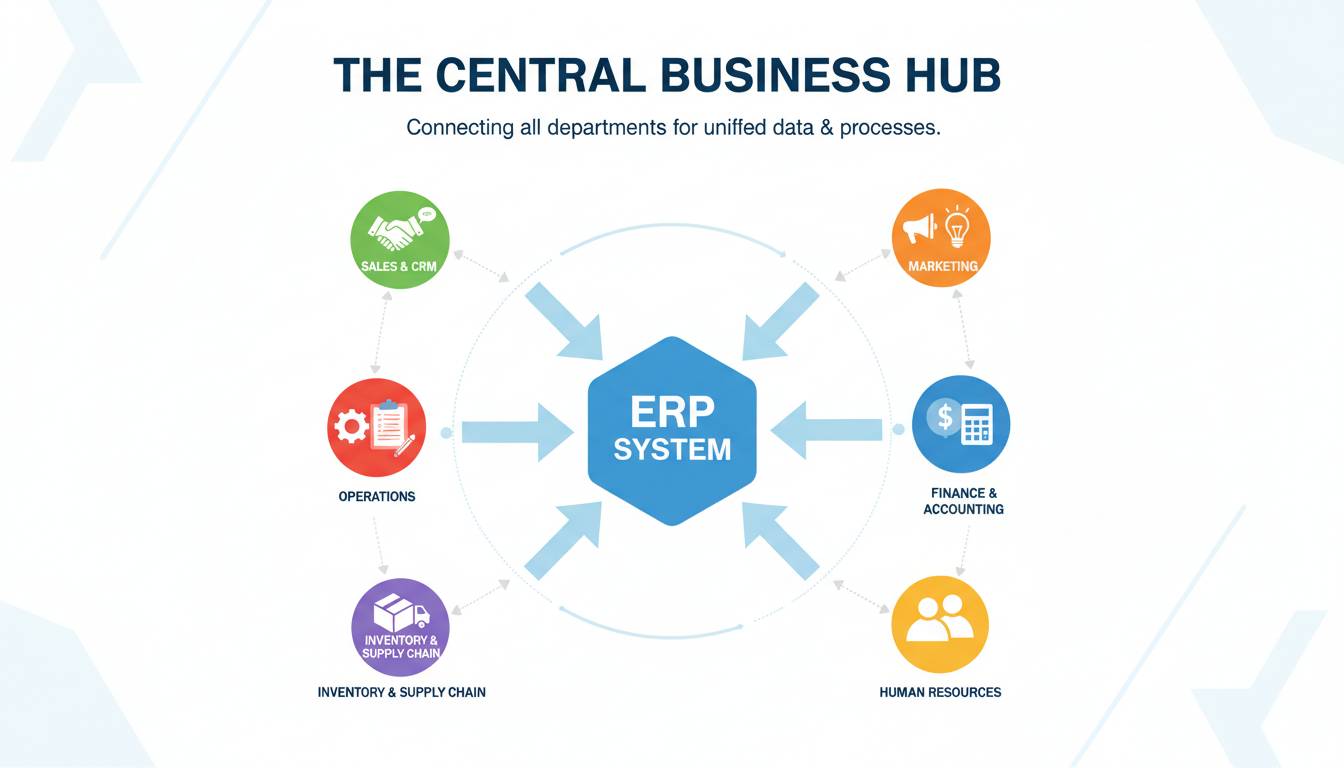
An ERP (Enterprise Resource Planning) system is software that integrates core business functions into a single unified database. Instead of your finance team using one program, your inventory team using another, and your sales team using a third—with data manually transferred between them—an ERP pulls everything into one place. When a sale is recorded, inventory automatically updates, accounting entries are generated, and your production team sees the change in real time.
The concept came from Material Requirements Planning (MRP) systems in the 1990s, which focused on manufacturing. SAP, founded in 1972, built one of the first modern ERP platforms. Oracle entered the market in 1977 and later acquired PeopleSoft in 2004 to strengthen its ERP portfolio. These enterprise giants dominated the space for decades, building systems so complex that only large corporations could afford them.
Cloud-based ERP has changed the math significantly. Traditional on-premise implementations required six-figure licensing fees, dedicated IT staff, and twelve-month rollouts. Cloud ERP from vendors like NetSuite (now part of Oracle), Microsoft Dynamics 365, and Sage Intacct lowered the barrier to entry dramatically. As of early 2025, the global ERP market exceeds $50 billion annually, with small and mid-market segments growing the fastest.
The core value remains the same: eliminate data redundancy, improve accuracy, and give leadership a unified view of business performance. But whether that value materializes for a ten-person company versus a five-hundred-person enterprise is a very different calculation.
Key Features of ERP Systems
ERP systems typically bundle multiple functional modules, though not all vendors structure them the same way. Understanding these core components helps you evaluate whether you actually need them.
Finance and Accounting: This is the backbone of virtually every ERP system. General ledger, accounts payable, accounts receivable, fixed assets, and financial reporting flow through a single source of truth. When properly implemented, you eliminate the reconciliation nightmares that plague businesses running QuickBooks alongside Excel spreadsheets alongside a legacy system.
Inventory Management: For product-based businesses, this module tracks stock across warehouses, manages reorder points, handles lot and serial number tracking, and integrates with purchasing. TradeGecko (now QuickBooks Commerce) and Cin7 Orderhero are examples of inventory-focused solutions that grew into broader ERP functionality.
Customer Relationship Management (CRM): Many ERP vendors bundle CRM capabilities or integrate tightly with dedicated CRM platforms. Salesforce, despite being primarily a CRM company, positions its Financial Services Cloud and Manufacturing Cloud as ERP-adjacent solutions. The CRM-ERP integration question is actually one of the most important evaluation criteria—some businesses are better off keeping these functions separate.
Human Resources and Payroll: Employee onboarding, time tracking, benefits administration, and payroll processing appear in comprehensive ERP suites. Workday, though primarily positioned as an HR platform, has expanded into financial management, creating an interesting category convergence.
Supply Chain and Operations: Manufacturing businesses need production planning, bill of materials management, and shop floor tracking. SAP and Oracle still dominate this space for complex manufacturing, while smaller players like DEAR Systems target light manufacturing and distribution.
Reporting and Analytics: Perhaps the most valuable feature for growing companies is the ability to generate real-time dashboards. Rather than waiting for month-end closes to understand financial performance, leadership can see key metrics daily or even hourly.
The key insight here is that most small businesses don’t need all these modules simultaneously. A service-based company has no use for inventory management, while a wholesale distributor doesn’t need manufacturing capabilities. Paying for features you’ll never activate is where many ERP implementations go wrong.
Do Small Businesses Actually Need an ERP System?
Here’s where I need to be direct: most small businesses do not need an ERP system, and I’d be doing you a disservice to suggest otherwise. The ERP industry has spent decades overselling small companies on enterprise-grade solutions they weren’t ready for, and the failure rates are staggering. Gartner research has consistently shown that a significant percentage of ERP implementations fail to meet objectives, and small businesses bear disproportionate risk due to limited IT resources and implementation expertise.
That said, certain thresholds make ERP not just useful but necessary.
When you have multiple disconnected systems: If you’re entering the same data in three or four different places, you’ve crossed the first threshold. Every duplicate data entry point is an error waiting to happen and a time sink that scales poorly.
When your reporting takes more than a day to compile: If your finance team spends three days pulling together month-end reports, you’re operating blind. By the time you see the numbers, they’re already outdated.
When you can’t answer basic questions about your business: “What’s our gross margin on Product X?” “How many units do we have in Warehouse B?” “What’s our actual cost to fulfill Order Y?” If these questions require manual investigation, you need centralized data.
When you’re adding complexity faster than your processes can handle: Opening a second location, launching a new product line, expanding into B2B and B2C simultaneously—these growth triggers expose the cracks in spreadsheet-based operations almost immediately.
When compliance or customer requirements demand it: Some industries have regulatory requirements around traceability and audit trails. Automotive suppliers, pharmaceutical distributors, and food businesses increasingly face customer demands for electronic data interchange and lot tracking that spreadsheets simply cannot support.
The honest counterargument, which many ERP vendors won’t tell you, is that many growing businesses would be better served by integrating best-of-breed tools. Using QuickBooks for financials, HubSpot for CRM, and a dedicated inventory system can actually outperform a mid-market ERP that tries to do everything adequately. This approach requires more integration work, but it often delivers better functionality in each domain.
A manufacturing client I worked with implemented SAP Business One to manage their fifty-person operation. They spent eighteen months and nearly $200,000 only to abandon it for a combination of Cin7 for inventory and Xero for accounting. The SAP implementation couldn’t handle their specific job costing requirements without expensive customization, while Cin7 handled job costing out of the box. The lesson wasn’t that ERP is bad—it was that they chose the wrong platform for their actual needs rather than their perceived prestige needs.
ERP Costs for Small Businesses
Cost is where the ERP conversation gets real, and where many small businesses get burned. The industry has a transparency problem that makes comparing options genuinely difficult.
Cloud ERP pricing (monthly subscription):
- Entry-level: $40-100 per user per month for basic accounting with light ERP features (NetSuite Basic, QuickBooks Enterprise, Sage 50cloud)
- Mid-market: $100-250 per user per month for full-featured ERP with inventory, CRM, and reporting (Microsoft Dynamics 365 Business Central, NetSuite Standard, Acumatica)
- Upper mid-market: $250-500+ per user per month for advanced manufacturing, complex supply chain, or multi-entity management
On-premise ERP pricing (one-time license + maintenance):
- Initial licensing: $50,000-250,000+ depending on user count and modules
- Implementation: Typically 1.5-3x the license cost
- Annual maintenance: 15-22% of license cost
- Internal IT resources: Often the hidden cost that breaks budgets
For a small business with twenty users looking at a mid-market cloud solution, budget $50,000-75,000 annually including implementation, training, and ongoing subscription costs. For the same business considering on-premise, initial year costs often exceed $150,000 before you factor in hardware, implementation partners, and the opportunity cost of internal resources.
Hidden costs that vendors rarely emphasize include:
- Data migration from legacy systems (often requires consultant support at $150-300/hour)
- Process redesign and optimization (do not skip this—implementing ERP on top of bad processes just automates inefficiency)
- Extended training and change management (users resist new systems; underinvesting here is the most common implementation failure)
- Integration with existing tools (e-commerce platforms, shipping carriers, banking feeds)
- Customization and add-ons (most platforms have marketplace ecosystems with paid extensions)
The ROI calculation isn’t as simple as vendors suggest. Yes, ERP can reduce manual data entry and improve inventory turns, but those gains take 18-36 months to materialize fully. If your business is growing rapidly, you may outgrow your chosen ERP before you ever realize the projected savings.
ERP Alternatives for Small Businesses
If I’ve convinced you that full ERP might be overkill, here are the alternatives worth considering, organized by the problem you’re trying to solve.
For accounting-heavy needs: QuickBooks Online remains the dominant choice for businesses under $10 million in revenue. Xero offers strong inventory management for product-based businesses and has particularly strong integration with e-commerce platforms. Both integrate with hundreds of third-party apps, allowing you to build a custom stack that fits your exact needs rather than adapting your needs to a monolithic ERP.
For inventory management: TradeGecko (QuickBooks Commerce), inFlow Inventory, and Sortly provide focused inventory functionality that surpasses what many mid-market ERPs offer in this specific domain. The advantage is depth—these tools do one thing extremely well rather than doing many things adequately.
For combined accounting and inventory: Wave (free) handles basic accounting and receipts for service businesses. Phorest and Lightspeed combine point-of-sale with inventory and accounting for retail operations. The key is matching your operational complexity to your software complexity.
For CRM and operations: HubSpot’s CRM platform has expanded significantly, now offering operations management tools, proposal generation, and payment processing. For businesses where customer management drives most operational complexity, a CRM-first approach often makes more sense than an ERP-first approach.
For project-based businesses: Tools like BigTime or PSA Essentials serve professional services firms that need time tracking, billing, and resource management without the manufacturing and supply chain features of traditional ERP. Monday.com and Asana also offer project-centric functionality that overlaps with PSA territory.
The integration question becomes critical with best-of-breed approaches. Zapier, Make (formerly Integromat), and native API connections can link these systems together. For businesses with technical resources, this integration-first approach often delivers superior functionality at lower total cost. For businesses without technical resources, the simplicity of a single ERP system may justify paying a premium.
One honest limitation: building and maintaining integrations requires ongoing attention. When a vendor updates their API, integrations break. When data formats change, mappings fail. This operational overhead is the trade-off for flexibility.
How to Choose the Right ERP System
If you’ve determined that ERP makes sense for your business, the evaluation process deserves as much rigor as the initial decision. Rushing this phase is where most implementations fail.
Define your must-haves versus nice-to-haves before you start looking: Document your critical pain points and the specific capabilities that would solve them. Vendors are exceptional at demonstrating features you don’t need while glossing over limitations that matter to you. A structured requirements list keeps demonstrations focused.
Actually use the software before committing: Most vendors offer free trials or sandbox environments. Build a real scenario—a quote, an invoice, a purchase order, an inventory transaction—through the complete cycle. If the software frustrates you during a thirty-minute demo, it will paralyze you during daily use eighteen months from now.
Talk to existing customers, not just vendor sales teams: Ask current users about implementation timelines, hidden costs, support quality, and whether they’d choose the same system again. The vendor will provide reference customers who succeeded; dig for the honest perspective.
Evaluate the partner ecosystem: Your ERP is a long-term relationship, and the vendor’s partner ecosystem—implementation consultants, add-on developers, system integrators—will significantly impact your success. A technically excellent platform with no local implementation partners may be impossible to deploy effectively.
Plan for growth, but not infinitely: Choose a system that handles your projected complexity three years out, not your wildest fifteen-year fantasy. Buying massive overcapacity today wastes money; buying too little forces expensive migrations later.
Budget realistically, including failure scenarios: Plan for the implementation to take 20-40% longer than promised and cost 30-50% more than quoted. Build a rollback plan in case the implementation fails catastrophically. I’ve seen too many businesses blindsided by implementation reality to recommend anything less.
The implementation timeline for small businesses typically ranges from three months (cloud ERP with minimal customization) to eighteen months (on-premise or heavily customized deployments). Microsoft Dynamics 365 Business Central, for instance, generally allows smaller organizations to go live within 2-4 months with an experienced partner, while NetSuite implementations for more complex requirements commonly stretch to 6-12 months.
Conclusion
ERP systems solve real problems for businesses that have outgrown simple tools—but the industry has done a disservice by positioning these systems as universal necessities. The honest answer to whether your small business needs one is: probably not yet, but probably eventually, and the timing matters enormously.
If you’re running your business on spreadsheets and feeling the pain, start by addressing the specific pain points with targeted tools. Integrate them thoughtfully. Let your operational complexity grow into the solution rather than forcing yourself into enterprise software before you’re ready.
When you do reach the threshold—when multiple disconnected systems create daily friction, when reporting delays leave you flying blind, when growth demands process rigor you can’t manually maintain—choose your ERP based on what it actually does for your specific business, not on vendor reputation or feature lists. The best ERP for a ten-person manufacturing company looks very different from the best ERP for a thirty-person service firm.
The technology will continue evolving. AI and machine learning integration into ERP platforms is accelerating, with vendors adding predictive forecasting, automated reconciliation, and intelligent process automation at a rapid pace. The question isn’t whether ERP will become more capable—it’s whether your business will become complex enough to justify embracing that capability on its terms rather than the vendor’s.
